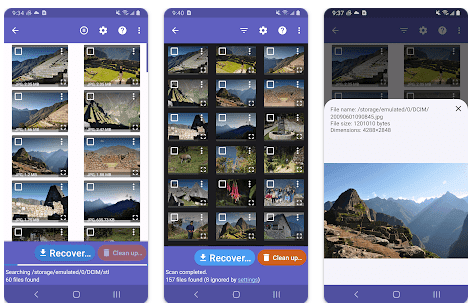
In today’s digital world, photos capture precious memories, document life’s journeys, and hold immense sentimental value. But with the increasing reliance on smartphones for photography, the fear of accidental photo deletion becomes a constant worry. Fortunately, data recovery apps like DiskDigger Photo Recovery APK offer a lifeline for Android users facing photo loss. This comprehensive review delves into DiskDigger’s functionalities, user experience, effectiveness, and suitability to help you decide if it’s the right solution for retrieving your lost photos.
What is DiskDigger photo recovery Apk Download?
DiskDigger Photo Recovery APK is a free-to-download app for Android devices that specializes in recovering deleted photos from internal storage and external SD cards. It employs data recovery techniques to scan the device’s memory for traces of photos even after deletion. With its user-friendly interface and powerful scanning capabilities, DiskDigger empowers users to potentially salvage precious memories they thought were lost forever.
How DiskDigger Photo Recovery Apk Download Works
Understanding how data recovery works is crucial before diving into DiskDigger’s functionalities. When you delete a photo on your Android device, the file itself isn’t instantly erased. Instead, the space it occupied becomes marked as “free” for new data to be written over. DiskDigger uses sophisticated algorithms to scan this “free” space, searching for remnants of deleted photos. The success rate of recovery depends on various factors, including how long ago the photos were deleted and whether new data has overwritten them.
Features of DiskDigger Photo Recovery APK
-
Photo Recovery from Various Sources:
- Internal Storage Recovery: DiskDigger can scan the internal storage of your Android device, where photos are typically saved by default camera apps.
- SD Card Recovery: If you store photos on an external SD card, DiskDigger can scan it as well, offering a chance to recover photos accidentally deleted from the card.
- Supported Photo Formats: DiskDigger supports recovery of various popular photo formats, including JPG, PNG, GIF, and potentially more depending on the device and file system.
-
Deep Scan for Extensive Search: DiskDigger offers two scan modes: Basic Scan and Deep Scan. Basic Scan is a quicker option that searches for recently deleted files in readily accessible locations. Deep Scan, however, delves deeper into the device’s memory, offering a more thorough search but taking considerably longer. It’s recommended for situations where photos were deleted a while back.
-
Selective Recovery with Preview: One of DiskDigger’s valuable features is the ability to preview recovered photos before restoring them. This allows you to prioritize important photos and avoid wasting storage space on unnecessary files. The preview functionality provides details like file size and resolution, giving you a basic idea of the recovered photo’s quality.
-
Cloud Storage Support (Optional Feature): The free version of DiskDigger might not offer cloud storage recovery functionality. However, the Pro version may support recovering photos from popular cloud storage services like Google Drive and Dropbox. This can be helpful if you accidentally deleted photos synced with your cloud storage.
Pros of DiskDigger Photo Recovery APK
| Feature | Description |
|---|---|
| Easy-to-use Interface | DiskDigger boasts a user-friendly interface with clear instructions, making it accessible even for non-tech-savvy users. |
| Free Basic Recovery | The free version allows basic photo recovery, perfect for casual users who need to retrieve recently deleted photos. |
| Deep Scan for Extensive Recovery | The Deep Scan feature offers a powerful tool for recovering photos deleted a while back, increasing the chances of success. |
| Selective Recovery with Preview | Previewing recovered photos before restoration helps prioritize important files and avoid unnecessary storage consumption. |
| No Rooting Required (Free Version) | The free version of DiskDigger doesn’t require rooting your Android device, making it a safe and accessible option. |
Cons of DiskDigger Photo Recovery APK
| Feature | Description |
|---|---|
| Limited File Format Support (Free Version) | The free version might have limitations on recoverable file formats compared to the Pro version. |
| Slower Deep Scan | Deep Scan can be significantly slower than Basic Scan due to its in-depth search, requiring patience from the user. |
| Limited Cloud Support (Free Version) | Cloud storage recovery might be exclusive to the Pro version, hindering retrieval from cloud-synced photos in the free version. |
| Recovery Success Depends on Various Factors | The success rate of photo recovery depends on factors like deletion time and overwriting, potentially resulting in incomplete recovery. |
DiskDigger Photo Recovery Apk Download Alternatives
While DiskDigger is a popular choice, exploring alternatives can provide a well-rounded perspective. Here’s a comparison of DiskDigger with two other prominent photo recovery apps for Android:
| Feature | DiskDigger | Recuva | Undeleter |
|---|---|---|---|
| Supported Platforms | Android | Android, Windows, Mac | Android |
| Free Version Features | Basic Photo Recovery, Deep Scan, Preview | Basic Photo Recovery | Basic Photo Recovery |
| Pro Version Features | More File Format Support, Cloud Storage Recovery (Optional), Additional Features may vary | Advanced Features like RAW file recovery, Partition recovery | Advanced Features like Video recovery, Secure Erase |
| Ease of Use | Easy to Use | Easy to Use | Easy to Use |
| Cost of Pro Version | Varies | Paid Software | Freemium Model (Free with in-app purchases) |
Recuva is a well-established data recovery software available for both Android and desktop platforms (Windows, Mac). Similar to DiskDigger, it offers basic photo recovery with a free version and advanced features like RAW file recovery in the Pro version.
Undeleter is another popular Android app focusing on data recovery. It boasts a user-friendly interface and offers basic photo recovery in the free version. The Pro version unlocks advanced functionalities like video recovery and secure erase for permanent deletion of unwanted files.
Choosing the right alternative depends on your specific needs. If you require advanced features like RAW file recovery or data recovery across different platforms, Recuva might be a better choice. If video recovery is a priority, Undeleter could be a suitable option. However, for basic photo recovery needs on Android, DiskDigger remains a strong contender due to its free version and user-friendly interface.
Conclusion and Verdict: DiskDigger Photo Recovery Apk Download
DiskDigger Photo Recovery APK emerges as a valuable tool for Android users facing photo loss. Its user-friendly interface, free basic recovery, and deep scan functionality make it an accessible solution for retrieving recently or even somewhat older deleted photos. The ability to preview recovered photos before restoration adds another layer of convenience. However, it’s important to understand limitations like potentially limited file format support in the free version and the dependence of recovery success on various factors.
Verdict:
- Casual Users: For casual users who accidentally deleted recent photos, DiskDigger’s free version offers a perfect solution with its ease of use and basic recovery capabilities.
- Advanced Users: Users seeking more extensive recovery options, including cloud storage support and a wider range of file formats, might benefit from exploring the Pro version or alternative apps like Recuva.
Ultimately, DiskDigger Photo Recovery APK proves to be a reliable and user-friendly option for recovering lost photos on Android devices. Consider your specific needs and budget when deciding if it’s the right solution for you.
FAQs: DiskDigger Photo Recovery Apk Download
1. Can DiskDigger recover photos deleted a long time ago?
The success rate of recovering photos with DiskDigger depends on how long ago they were deleted. Deep Scan can potentially recover photos deleted a while back, but the chances decrease if the storage space has been overwritten with new data.
2. Is rooting my device necessary for using DiskDigger?
The free version of DiskDigger doesn’t require rooting your Android device. However, the Pro version might have some features that require root access for deeper system scans.
3. What are some alternatives to photo recovery apps?
If photo recovery apps fail, consider data recovery services offered by professional companies. However, these services can be expensive. Alternatively, if you have cloud backups enabled, you might be able to restore photos from your cloud storage provider.